
macOS Available

SCleaner for Mac

A native Mac app that helps you sort files, clear out temporary data and mail, and understand the health of your disk. It works on your Mac — your files are never uploaded.

Available

Version 0.1.0

The download link for version 0.1.0 has not been published yet. It will appear here as soon as the installer is online.

Installation steps · System requirements

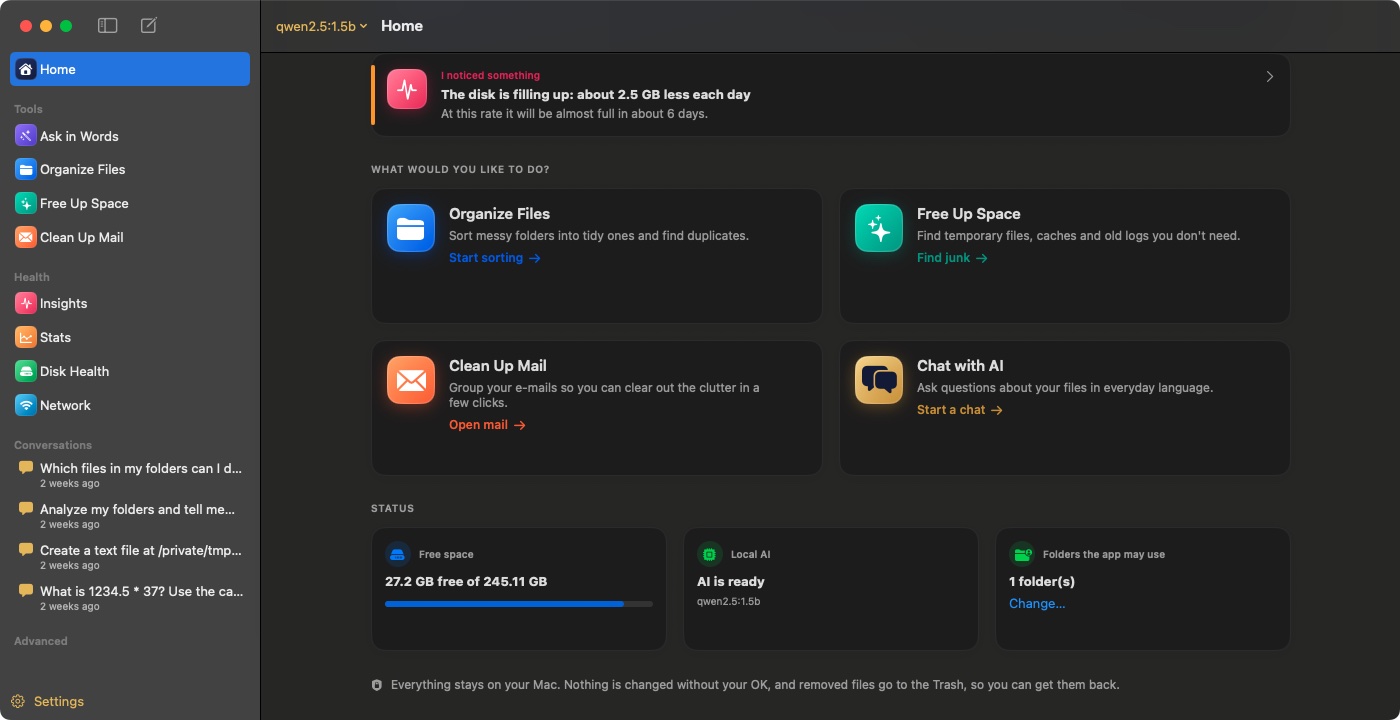
SCleaner for Mac home screen: Organize Files, Free Up Space, Uninstall Apps and Clean Up Mail tasks, and free space, Mac health and folder status
SCleaner for Mac, home screen.

Features in SCleaner for Mac

Everything listed here works in version 0.1.0.

Organize Files

Sorts loose files on your Desktop, Downloads and Documents into category folders. Every move is listed for your confirmation and can be undone.

Includes custom sorting rules (name, extension, type, age, size) and a disk map of folder sizes.

Free Up Space

Finds temporary files, unfinished downloads, old logs and rebuildable caches from a fixed, documented list. Items are moved to the Trash or Recycle Bin, never deleted permanently.

Also covers browser, app and package-manager caches, Xcode data and logs. macOS system caches are never touched.

Clean Up Mail

Connects to your mailbox over IMAP, groups messages by category, sender, size and age, and helps you clear out newsletters and notifications in a few clicks.

Your mail password is stored only in the macOS Keychain.

Device Health

Reads your disk’s health data — temperature, wear, spare blocks and errors — and explains the results in plain language.

Performance Insights

Keeps a local history of startup time, free space, disk wear, battery capacity and crashes, and tells you what changed compared with previous weeks.

Smart Recommendations

Cleanup suggestions come with a reason and a confidence level, so you can see why a file is suggested before you decide.

Duplicate Finder

Finds exact duplicates by comparing file contents, as well as numbered copies such as “Report (1).pdf”.

Also finds similar photos — the same picture saved at another size or format.

App Uninstaller

Removes apps together with the settings, caches and other files they leave in your Library folder. Apple apps are protected.

System Stats

Live readings for CPU, GPU, memory, disks, sensors, network, battery and connected Bluetooth devices.

Frequency and power readings are available on Apple silicon Macs only.

Network Diagnostics

Checks your connection step by step — Wi-Fi, router, internet, DNS and login pages — names the most likely problem and suggests a fix. Includes a speed test.

New File Alerts

Optional: notifies you when a new download finishes on your Desktop or in Downloads, so you can sort it right away. Nothing is moved automatically.

System requirements

Operating systemmacOS 14 Sonoma or later
ProcessorApple silicon or Intel (universal app)
LanguagesEnglish and Bulgarian
InternetNot needed, except for Clean Up Mail, Network Diagnostics and the speed test

How to install

  1. Download the .dmg file and open it.
  2. Drag SCleaner into the Applications folder.
  3. Open SCleaner from Applications. The current version is not yet notarized by Apple, so macOS may say it cannot verify the developer.
  4. If that happens, open System Settings › Privacy & Security, scroll down and click Open Anyway next to SCleaner. You only need to do this once.
  5. In SCleaner, choose which folders it may use. macOS asks once for Desktop, Documents and Downloads.

Using SCleaner safely

  • SCleaner only works inside the folders you allow. System folders, ~/Library (except known cache locations), app bundles and software project folders are never touched.
  • Nothing changes until you confirm a list that shows every file.
  • Files are moved to the Trash, never deleted permanently, so you can restore them.
  • Organizing moves can be undone with Undo.
  • Items marked Review need your judgement — check them before removing.

Frequently asked questions

Does SCleaner upload my files?

No. Scanning and organizing happen on your Mac. The app contacts the internet only for features that need it: your mail server for Clean Up Mail, and network checks and the Cloudflare speed test in Network Diagnostics.

Why does macOS say it cannot verify the developer?

Version 0.1.0 is not notarized by Apple yet. Use Open Anyway in System Settings › Privacy & Security once. See the installation steps above.

Can I undo changes?

Yes. Organizing moves can be undone in the app, and anything removed goes to the Trash, from where you can put it back.

How do I uninstall SCleaner?

Quit the app and drag it from Applications to the Trash. Its data is in ~/Library/Application Support/AIDesktopAssistant; delete that folder too if you want to remove your settings and history.

More answers in the Help Center.